Introducing QuickAdmin – A Lightweight Modern Admin Interface for Rails 03/11/2025 ~ Views: 1268
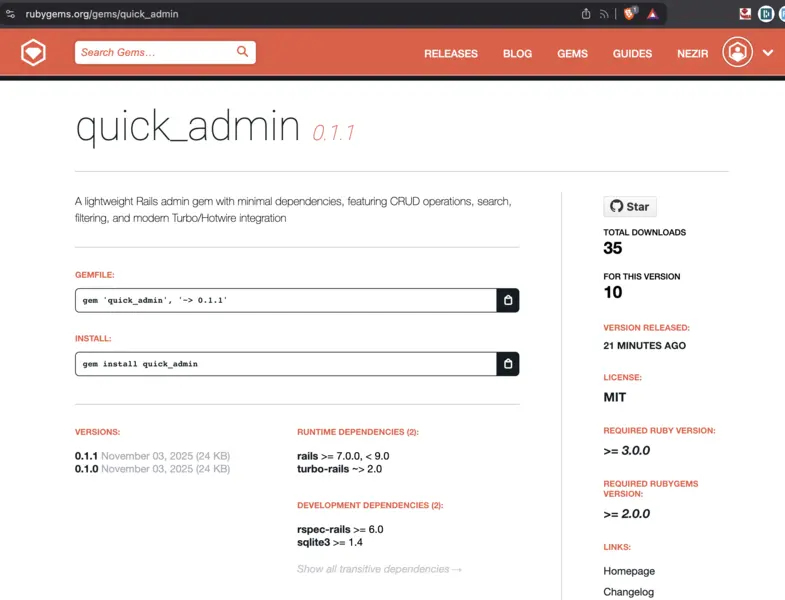
If you’ve ever needed a quick, clean, and modern admin interface for your Ruby on Rails app — without pulling in massive dependencies or complex DSLs — you’re going to love QuickAdmin.
QuickAdmin is a new open-source gem that brings a minimal, Turbo-powered admin interface to Rails, designed for speed, simplicity, and developer happiness.
🚀 Why QuickAdmin?
Existing Rails admin frameworks like ActiveAdmin, RailsAdmin, or Administrate are powerful, but they can also be heavy, opinionated, and hard to customize.
QuickAdmin takes a different approach:
- Lightweight by design — only depends on Rails
- Modern frontend powered by Turbo and Stimulus
- Instant setup with sensible defaults
- Fully configurable and easy to extend
You can go from zero to admin interface in under two minutes.
⚙️ Installation
Add it to your Gemfile:
gem 'quick_admin'
Then install and configure:
bundle install

rails generate quick_admin:install
That’s it! Your new admin dashboard will be available at:
💡 Example Configuration
QuickAdmin uses a clean, DSL-style configuration file to define your resources.
config/initializers/quick_admin.rb
QuickAdmin.resource :user do |r|
 r.fields :name, :email, :created_at
 r.searchable :name, :email
 r.editable :name, :email
end
Visit /admin/users and you’ll instantly get:
- A searchable and filterable table
- Edit and delete actions
- Turbo-powered modal forms
- Responsive layout out of the box
✨ Key Features
✅ Minimal Dependencies — Only requires Rails
✅ Modern UX — Built on Turbo & Stimulus
✅ CRUD Operations — Create, Read, Update, Delete
✅ Real-Time Search & Filtering
✅ Bulk Actions — Mass delete and more
✅ Active Storage Uploads
✅ Responsive Design
✅ Optional Integrations: Devise, Tailwind, Bootstrap, Trix
✅ Modern UX — Built on Turbo & Stimulus
✅ CRUD Operations — Create, Read, Update, Delete
✅ Real-Time Search & Filtering
✅ Bulk Actions — Mass delete and more
✅ Active Storage Uploads
✅ Responsive Design
✅ Optional Integrations: Devise, Tailwind, Bootstrap, Trix
🧩 Configuration Options
QuickAdmin is designed to fit into your stack seamlessly.
QuickAdmin.configure do |config|
 config.authentication = :devise # :devise, :custom, or nil
 config.css_framework = :tailwind # :tailwind, :bootstrap, or :none
 config.text_editor = :trix # :trix, :lexical, or :textarea
 config.per_page = 25
 config.mount_path = '/admin'
 config.app_name = 'My Admin'
end
🔒 Authentication
By default, QuickAdmin doesn’t enforce authentication — ideal for development or internal apps.
But for production, simply enable one of the built-in options:
config.authentication = :devise
or define your own method:
config.authentication = :custom
class ApplicationController < ActionController::Base

 private

 def admin_authenticated?
  current_user&.admin?
 end

end
🎨 Styling Options
QuickAdmin works out-of-the-box, but you can easily integrate your preferred CSS framework:
- Tailwind CSS
- Bootstrap
- None (custom styles)
And for text editing, choose from:
- Trix (ActionText)
- Lexical
- Simple Textarea
🛠️ Development & Testing
QuickAdmin is fully tested with RSpec. To run tests or explore the demo app:
bundle install
bundle exec rspec
cd spec/dummy
 rails db:migrate
 rails server
🗺️ Roadmap
Upcoming features include:
- Advanced filtering
- Export to CSV/Excel
- Custom actions per resource
- Batch updates
- Audit trails
- Role-based permissions
- Dashboard customization
- API endpoint generation
💬 Contribute & Support
QuickAdmin is open-source under the MIT License and welcomes community contributions!
Whether you’d like to report a bug, suggest a feature, or submit a pull request, we’d love your help improving the gem.
❤️ Final Thoughts
QuickAdmin was built to get out of your way — so you can focus on building your app, not your admin panel. It’s simple, modern, and Rails-native.
If you’re looking for a lightweight alternative to ActiveAdmin or RailsAdmin, give QuickAdmin a try today.
Gem: https://rubygems.org/gems/quick_admin
License: MIT
Made with ❤️ by the Rails community
Sample of basic implementation and look!
License: MIT
Made with ❤️ by the Rails community
Sample of basic implementation and look!


Tags: quick_admin rubyadmin #admingem #rubygem
OPEN TO HIRE


Nezir Zahirovic
Ruby On Rails Full stack last 10 years.
C#, ASP.NET, JavaScript, SQL, CSS, Bootstrap 11 years.
C#, ASP.NET, JavaScript, SQL, CSS, Bootstrap 11 years.


Top articles
Best Apps for Staying in Contact With Family and Friends >>>
Hey I Am Alive – The Easiest Way to Stay in Touch With Pe... >>>
10 Simple Ways to Stay in Touch With Family Who Live Far ... >>>
Why Checking on Friends Regularly Is More Important Than ... >>>
🚨 LinkedIn → GitHub → Web3: How a “Senior Fullstack” Offe... >>>